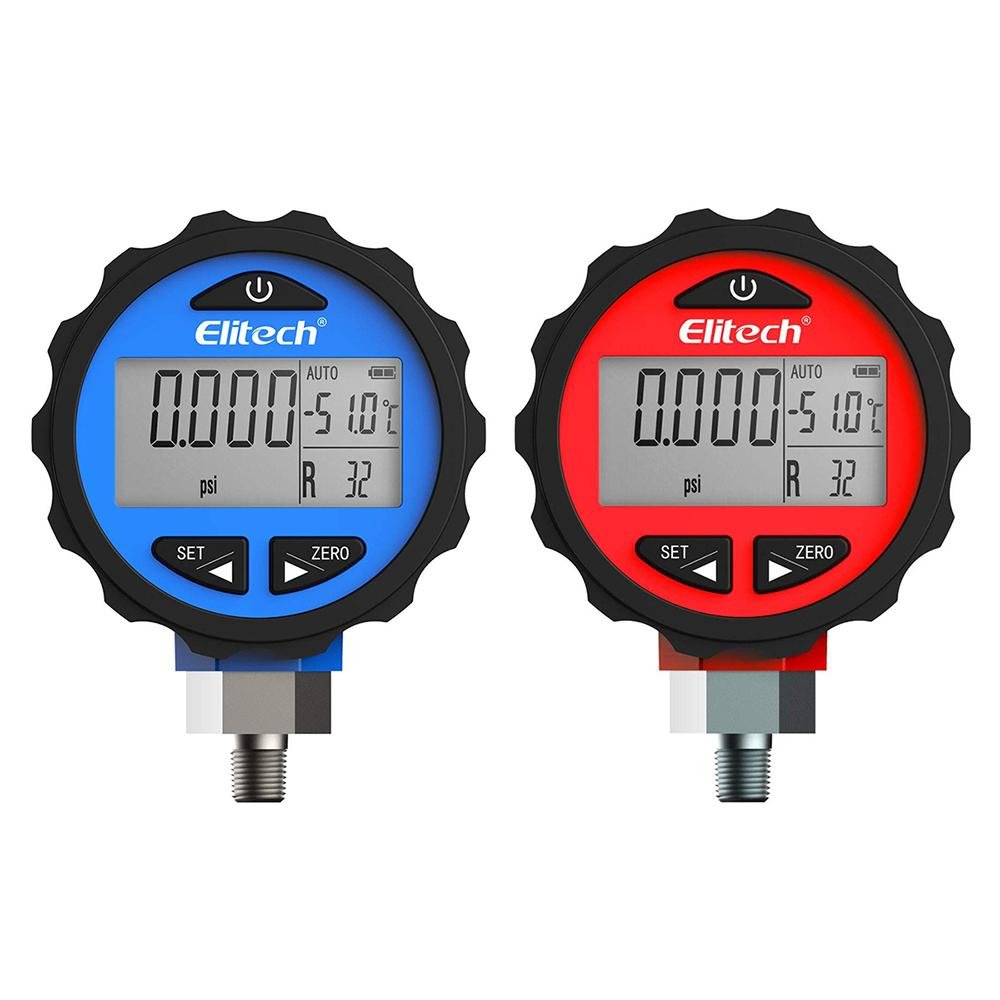
Elitech PG-30 Pro Red & Blue Digital Pressure Gauges High and Low Pressure Gauges for HVAC 87+ Refrigerants with Backlight là đồng hồ đo áp suất kỹ thuật số, cho phép đo áp suất hệ thống theo thời gian thực. Thiết bị được thiết kế để sử dụng trong hệ thống đường ống, hệ thống làm lạnh và các ứng dụng liên quan khác.
| Thông số | Giá trị |
|---|---|
| Phạm vi đo áp suất | Đồng hồ đỏ: -0.100 ~ 5.515 MPa (-14.5 ~ 800 psi) Đồng hồ xanh: -0.100 ~ 3.448 MPa (-14.5 ~ 500 psi) |
| Độ phân giải áp suất | 0.001 MPa, 0.5 psi |
| Độ chính xác | ±0.5% FS |
| Chu kỳ lấy mẫu | 1 giây/lần |
| Đơn vị đo áp suất | MPa, bar, psi, kPa, kg/cm², cmHg |
| Đơn vị nhiệt độ | ℃ / ℉ |
| Màn hình hiển thị | LCD có đèn nền xanh, kích thước 50 × 26 mm |
| Thời gian đèn nền | Tắt sau 3 / 4 / 5 / 10 / 15 giây nếu không thao tác |
| Tự động tắt nguồn | Có thể cài 10 / 20 / 30 / 40 phút hoặc OFF (luôn bật) |
| Cài đặt thông số | Tự động tắt, đơn vị áp suất/nhiệt độ, thời gian đèn nền |
| Bảng PT | Liệt kê áp suất & nhiệt độ của 87 loại môi chất lạnh thông dụng |
| Nguồn điện | 3 pin AAA (bao gồm) |
| Tuổi thọ pin | Xấp xỉ 1 năm, có chỉ báo pin yếu |
| Môi trường hoạt động | Nhiệt độ: -10℃ ~ 60℃ Độ ẩm: 35% ~ 85% RH |
| Cảnh báo quá áp | Hiển thị ALARM trên màn hình nếu: • Đồng hồ xanh > 500 psi, đồng hồ đỏ > 800 psi • ALARM + đèn nền nhấp nháy nếu: đồng hồ xanh > 625 psi, đồng hồ đỏ > 1000 psi |

![[HTV9 Đưa Tin] Giải Pháp Số Hóa Chuỗi Lạnh Smarttech Tại Vietfish 2026](https://congnghethongminh.com.vn/datafiles/17450/upload/thumb_images/1787649728673_605039037258228202_605039037258228202_5019c4edb3d5829b18b98063f26d35b0.jpg?t=1791951627)
![[VIETFISH 2026]: SMARTTECH – Kết Nối, Chia Sẻ & Kiến Tạo Giá Trị Chuỗi Lạnh Thủy Sản](https://congnghethongminh.com.vn/datafiles/17450/upload/thumb_images/Screenshot%202026-08-24%20142038%282%29.png)



SMARTTECH: Giải pháp tối ưu cho doanh nghiệp của bạn!
Smarttech: Chuyên nghiệp – Chuẩn xác – Tiên phong
Đừng để những rắc rối kỹ thuật làm chậm bước tiến của bạn. Đội ngũ chuyên gia của Smarttech sẵn sàng lắng nghe và hỗ trợ 24/7.
Kết nối cùng Smarttech ngay để bắt đầu hành trình bứt phá.
1900-633-603